Guide
Same level on your phone and your PC: moving your progress in Chalo Jantar Mantar

Sandeep Sahu
· 5 min read
A lot of you play Chalo Jantar Mantar on a phone during the day and on a computer at night. Until now, each one had its own level, so a Level 5 on the phone was a Level 1 on the PC. Players kept telling me about it, so the game now lets you take your progress to another device with a one-minute code. There is no login, no password and no email.
Why your level stayed on one device
The game has no accounts. When you first open it, your browser gets its own random ID, which is never shown to anyone, and the game remembers your XP, level, rewards, missions, Jugaad cards and weekly points under it. A few things, like your name, your look and your badges, stay in the browser itself.
A different phone, a different computer, or even a different browser on the same computer has a different ID. To the game, that is a new player. I wanted to fix that without making everyone sign up: no login means nothing for you to forget and no personal details for me to look after.
How to move your progress, step by step
You need both devices in front of you, with the game open on each. The one that has your progress is the old device; the one you want it on is the new device.
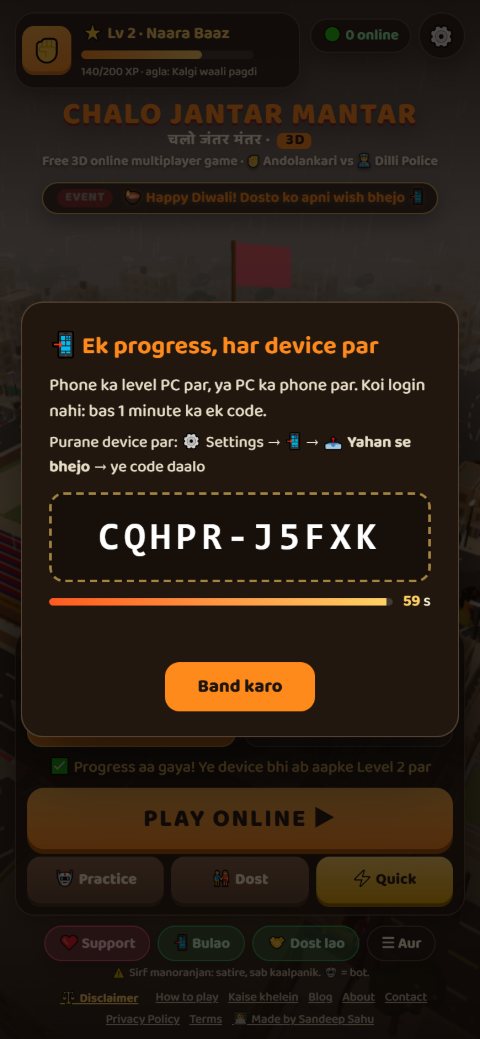
- On the new device: open ⚙️ Settings and tap 📲 Doosre phone/PC par khelo, then 📥 Is device par lao. A 10-character code appears, with a bar counting down one minute.
- On the old device: open ⚙️ Settings → 📲 → 📤 Yahan se bhejo, type the code (small or capital letters both work, the dash is optional) and tap 📤 Bhejo.
- Back on the new device: within a few seconds it shows whose progress is coming, with its level, XP, cards and badges, next to the new device's own level. Tap ✅ Haan, lo.
- The game reloads and says "✅ Progress aa gaya!". From now on both devices share one progress: a match on either one counts on both.
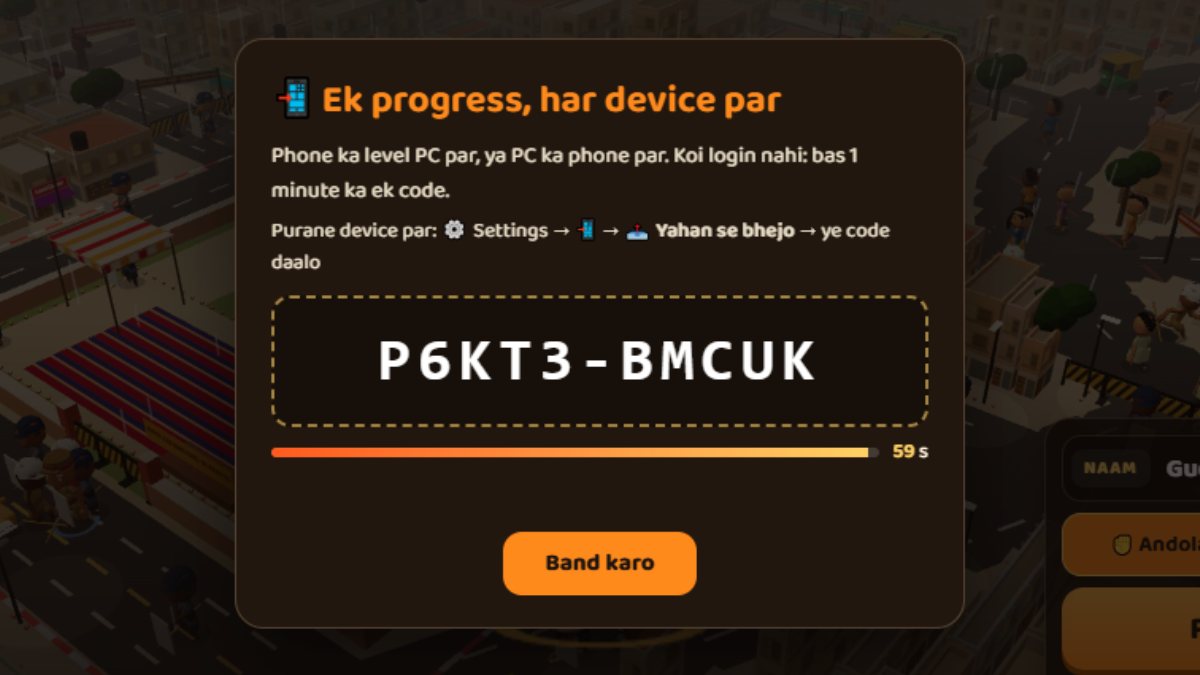
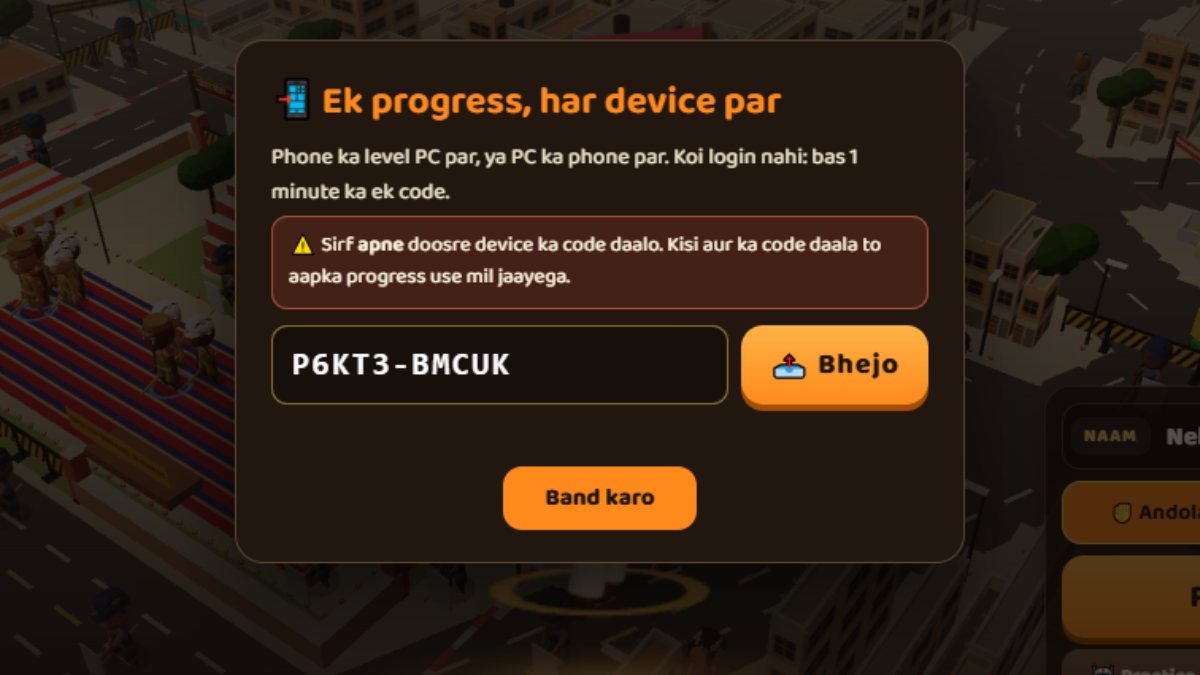
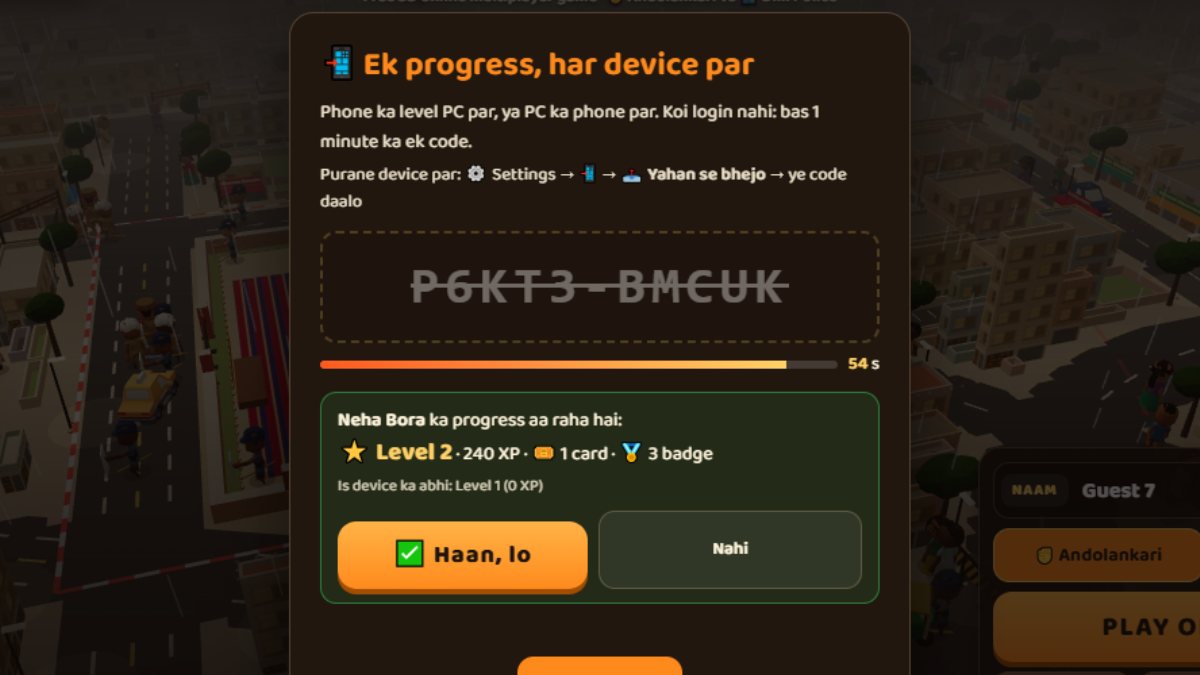
One minute is enough when both devices are in your hands, and it is short on purpose. If it runs out, tap 🔄 Naya code for a fresh one and type that instead.
What comes with you, and what stays
Comes with you: your level and XP, the rewards and clothes they opened, your daily reward run, this week's missions, your Jugaad cards, this week's points on the top 10, your name, side and look, your badges, and your daily challenge streak.
Joined together: badges from both devices are kept, and the bigger count wins for things like people freed from buses. Cards you earned on the new device (from wins, MVP or missions) join your hand, up to the usual 20.
Stays on each device: settings such as sound, graphics, the joystick, the mic naara, the camera and your key bindings, because a phone and a computer usually want different ones.
The higher level always stays. If the new device already has more XP than the old one, the move is refused and the game tells you to do it the other way round, so you can never lose a bigger progress by tapping the wrong button.
Why nobody can take your progress with a code
My first worry when I planned this was simple: what if someone types random codes until one works? Here is why that gets them nothing:
- A code can only send, never take. Typing a code sends your own progress to the device showing it. The only way your progress leaves your device is you typing a code on it and tapping Bhejo yourself. That is also why the send screen has a red warning: only ever type the code from your own other device.
- The new device has to agree. It sees whose progress is coming before anything changes, and "Nahi" leaves everything as it was.
- Codes are hard to guess. Ten characters from 31 letters and digits (0, O, 1, I and L are left out so nobody mixes them up) make more than 800 trillion possible codes.
- Each code works once, for one minute. A new code ends the old one, and trying code after code soon gets stopped.
If something doesn't work
- "Code galat hai, ya uska 1 minute nikal gaya": the code was mistyped or its minute ran out. Make a new one on the new device and type it straight away.
- "Ye isi device ka code hai": you typed the code into the same device that is showing it. Type it on the other one.
- "Is device ka level zyada hai": the new device already has the bigger progress. Open "📤 Yahan se bhejo" on this device and send it to the other one instead.
- Nothing appears on the new device: keep the code screen open; it checks every few seconds. If the minute has passed, make a new code and send again.
If a move goes wrong in some other way, tell me on the contact page what you saw on each screen, and I will look into it. More about levels and what they unlock is in levels, awards and rewards explained, and the cards that now travel with you are covered in the Jugaad Cards guide.